100 Keyboard Layout: Do You Really Need a Numpad?

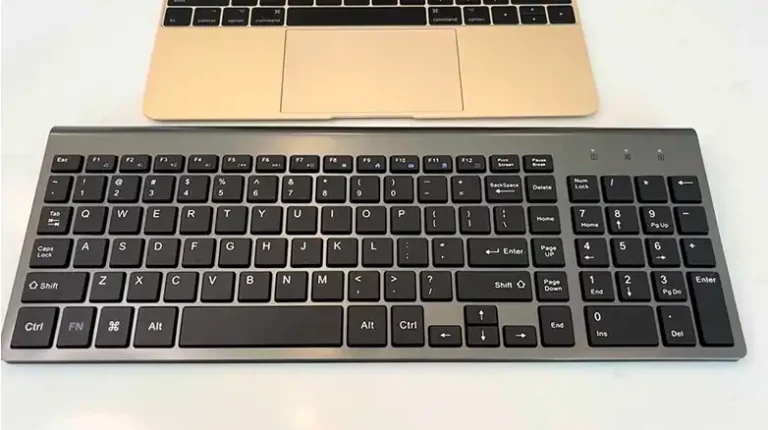
A 100 keyboard layout is a full-size keyboard, usually with about 104 keys, that includes the function row, navigation cluster, and a dedicated numpad. It is best for people who do a lot of numeric entry, spreadsheet work, accounting, or software that relies on numpad input.
The numpad question has a way of starting arguments in keyboard communities. Mention you’re thinking about going TKL or 75% and someone will tell you you’ll miss it. Stick with full-size and someone else says you’re wasting desk space on keys you never touch.
I’ve been on both sides of this. Used full-size boards for years, switched away, came back for specific jobs. The honest answer isn’t that one camp is right — it’s that the 100% layout makes sense for certain people and genuinely doesn’t for others. The mistake is assuming your situation is the same as everyone else’s.

What is a 100% keyboard layout?
A 100% keyboard is a full-size keyboard — the complete layout, nothing removed. On a Windows layout you’re looking at around 104 keys, 108 on some extended variants.
The zones break down like this:
The alphanumeric block — letters, number row, symbol keys. Every keyboard has this regardless of size.
The function row — F1 through F12 across the top. Present on full-size, TKL, and 75% boards, absent on 65% and 60% where it moves to a layer.
The navigation cluster — Insert, Delete, Home, End, Page Up, Page Down, dedicated arrow keys. Still there on TKL, progressively cut as you go smaller.
The number pad — the whole point of this conversation. A block of roughly 17 keys on the right: numerals, arithmetic operators, Enter, decimal. Remove it and you have a TKL. Keep it and you have a 100%.
Everything else on a 100% board also exists on a TKL. For practical purposes, full-size is a TKL with a numpad bolted to the right side.
That makes it a physically wide keyboard — 17 to 18 inches typically. Real desk space, which is why the debate exists.
How does the 100% layout compare to smaller keyboards?
100% (full-size) — All 104 keys. Function row, nav cluster, numpad.
TKL (~87%) — Drops the numpad. Everything else stays. Shrinks to around 14 inches wide. This is the first “do I actually need the numpad?” decision point.
75% — Keeps the function row and arrows, trims or compresses the navigation cluster. Space-efficient without requiring much adaptation.
65% — No function row. Arrow keys stay. F-keys move to a layer. You start feeling this if you use function keys regularly.
60% — No function row, no navigation cluster, no dedicated arrows on most layouts. Everything pushed to layers. Hugely popular for the compact footprint and cleaner look.
40% — Just the alphanumeric core. For people who’ve fully committed to layers.
The numpad is always the first thing to get cut. That’s not arbitrary — it reflects a rough consensus, built over years in the hobby, about what most people can do without. Worth thinking about what that implies.
Who actually benefits from a numpad?
The numpad is genuinely useful for specific kinds of work. If any of this sounds like your day, keeping a full-size board is the right call.
Data entry and spreadsheet-heavy work. This is where the numpad earns its keep. If you’re entering numbers all day — invoices, financial records, inventory, accounting — numpad input is faster than the number row. The layout mirrors a calculator you’ve been using since childhood. Muscle memory for numpad entry runs deep in anyone who’s done real data entry. One hand anchored on the numpad moves through rows of numbers faster than hunting across the number row with one finger. If this describes a meaningful chunk of your day, there’s no debate. Use the numpad.
CAD and 3D applications. AutoCAD, SolidWorks, Blender, 3ds Max all lean on numpad keys for viewport navigation. In Blender: Numpad 7, 1, 3 for top, front, and side views; 4, 6, 2, 8 for orbiting. You can remap all of it, but the software was designed around numpad navigation and it shows when you try to work around it.
Accounting and finance. The numpad is to an accountant what the number row is to a writer. Excel, QuickBooks, anything finance-adjacent — sustained numeric input is faster and more accurate with a dedicated numpad.
Alt codes and special characters. On Windows, Alt codes — holding Alt and typing a number — only function on the numpad. If you regularly type in languages with special characters or need extended symbols, the number row won’t cut it.
People who’d rather not deal with layers. Not everyone wants to learn function layers. If pressing Fn+J to type a 1 sounds like cognitive overhead you’d rather avoid, keeping dedicated keys is a reasonable call. The 100% is the most approachable layout in the hobby — every function is exactly where you expect it.
Shared setups. If the keyboard gets used by multiple people, or if you hand off work to someone unfamiliar with compact boards, full-size is more accessible. A 60% board in front of someone who’s never used one means ten minutes explaining where F5 went.
There’s also an ergonomic angle that doesn’t get discussed enough: if your right hand stays on the numpad during number entry instead of reaching up to the number row, you’re moving less. That matters for sustained data entry, not occasional number-typing.
When a smaller layout makes more sense
For all the legitimate use cases above, there are plenty of situations where a full-size board is more keyboard than you actually need — and where the extra width works against you.
Desk space is finite. Obvious, but immediately felt. A 100% keyboard pushes your mouse to the right. For right-handed users, that means your mousing arm is consistently extended further from your body, which creates shoulder and elbow strain over time. This is called “mouse reach” and it’s the most common reason people leave full-size boards behind. Gamers feel this the most acutely — left hand on WASD, right hand on mouse, numpad sitting there doing nothing while pushing your mouse arm further right than it needs to be.
Most people don’t use the numpad most of the time. Be honest about your habits. How often does your right hand actually travel there? If the answer is “occasionally for a number” rather than sustained data entry, the numpad isn’t paying rent. The number row handles casual number input without any trouble.
The centering problem. On a full-size board, the physical center falls somewhere around the numpad area — but your actual typing is centered on the alphanumeric block, which sits left of center once you account for the numpad’s mass on the right. The natural result is offsetting the keyboard to the left to center your typing area, which then puts the numpad awkwardly off the desk edge or forces the mouse into a bad position. Smaller layouts simply don’t have this problem.
Travel. A full-size keyboard is not a travel keyboard. If you carry it between home, office, and other locations, the size and weight become a genuine daily inconvenience. A 75% or smaller fits in a bag without fighting it.
Desk aesthetics. This matters in the hobby. A compact board with room for a proper desk mat and a large mouse pad looks cleaner than a full-size board shoved up to the monitor. If the visual balance of your setup matters — and it usually does here — a smaller layout is easier to work with.
The standalone numpad option. A USB numpad costs $15–$30. It sits where you need it when you’re doing data entry and gets pushed aside when you’re not. For most people this ends up being a better solution than committing to the permanent width of a 100% board.
Programmers. Most numbers in code get typed on the number row — that’s just how coding works. Writers, developers, and anyone outside of dedicated data entry will find the numpad mostly decorative.
How to pick the right layout
Three questions. Answer them honestly.
How often do you actually enter sustained numeric data?
Not “do I type numbers sometimes” — everyone does. The real question is volume: hundreds of spreadsheet rows, accounting software, invoicing systems, inventory management. If that’s a significant part of your working day, a 100% board earns its desk space. If you type numbers occasionally as part of general writing or browsing, the numpad isn’t doing much for you.
How much desk space do you have, and does your mousing arm ever bother you?
Measure where your keyboard and mouse actually sit. If you’re cramped, or if you’ve noticed right shoulder or elbow discomfort after long sessions, going to a TKL or smaller might solve it immediately. Big desk, comfortable setup already — the width penalty matters less.
Are you willing to use function layers for missing keys?
Going from 100% to TKL requires zero adaptation — every key still has a dedicated spot. TKL to 75% requires minor adjustment for the compressed nav cluster. 75% to 65% or 60% means learning Fn layers for F-keys and navigation. None of it is hard, but it takes time to settle in. If you’d genuinely rather not think about layers, the TKL is probably as small as you should go. You get a real size reduction without giving up any dedicated keys.
Where to start based on your situation:
Data entry, accounting, spreadsheet work: Start with a 100%. The numpad belongs in your workflow.
Gamers: TKL. Full function row, all navigation keys, and you lose the numpad width that was pushing your mouse arm out.
Writers and content creators: A 75% is worth looking at — function keys for shortcuts, dedicated arrows, compact without requiring much adaptation.
Programmers: If you’re deep in an IDE with lots of F-key shortcuts and want everything on a dedicated key, TKL is reliable. Comfortable with layers and want a cleaner desk, a 65% is worth trying.
Traveling with a keyboard: Go TKL or smaller. The difference when packing a 75% versus a full-size is immediately obvious.
New to mechanical keyboards: I’d start with a TKL or 75%. You get a real upgrade from the full-size you’re probably coming from, without immediately missing something. Spend some time with it, then decide if you want to go smaller. If you’re still deciding what style of board fits you, a computer keyboard buying guide can help narrow it down.
One more thing worth saying: you can own more than one board. Plenty of people keep a TKL at their main desk and a 65% for gaming or travel. The layouts aren’t competing — you can use the right tool for the right context.
Conclusion
The 100% keyboard is the right choice for the right person. Sustained data entry, living in spreadsheets, software that depends on numpad navigation, or no interest in adapting to a smaller layout — keep the full-size. The numpad earns its place.
But if you’re buying a full-size board because it’s what you’ve always used, or because “more keys” sounds like “better keyboard,” it’s worth asking whether the numpad is actually earning that real estate. For most people — gamers, writers, developers, anyone on a crowded desk — a TKL, 75%, or 65% fits better. The mouse reach issue alone is a compelling reason to go smaller.
The numpad isn’t the problem. It’s a specific tool for specific work, and it’s genuinely good at that work. The best layout is the one that matches what you actually do — figure out which side of that line you’re on, and go from there.
After that, the interesting decisions start: switches, keycaps, a board worth spending money on. That’s where the hobby actually gets its hooks in you.